Tuesday, October 30, 2018

Binary Search Tree

A Binary Search Tree (BST) is a tree in which all the nodes follow the below-mentioned properties −
  • The left sub-tree of a node has a key less than or equal to its parent node's key.
  • The right sub-tree of a node has a key greater than to its parent node's key.
Thus, BST divides all its sub-trees into two segments; the left sub-tree and the right sub-tree and can be defined as −
left_subtree (keys)  ≤  node (key)  ≤  right_subtree (keys)

Representation

BST is a collection of nodes arranged in a way where they maintain BST properties. Each node has a key and an associated value. While searching, the desired key is compared to the keys in BST and if found, the associated value is retrieved.
Following is a pictorial representation of BST −
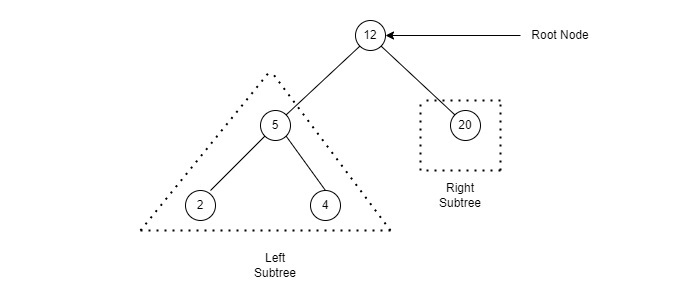
Binary Search Tree
We observe that the root node key (27) has all less-valued keys on the left sub-tree and the higher valued keys on the right sub-tree.
Copied from here.

My Solution:

public class Node {
Node left, right;
int value;
public Node(int value) {
this.value = value;
}
public Node add(int value) {
if (value < this.value)
if (this.left != null)
return this.left.add(value);
else
return this.left = new Node(value);
if (value > this.value)
if (this.right != null)
return this.right.add(value);
else
return this.right = new Node(value);
return this;
}
public Node find(int v) {
if (this == null || v == value)
return this;
else if (value > v && this.left != null)
return left.find(v);
else if (value < v && this.right != null)
return right.find(v);
else
return null;
}
public int findSmallestValue() {
return this.left == null ? this.value : this.left.findSmallestValue();
}
public void traverseInOrder() {
if (this.left != null)
this.left.traverseInOrder();
System.out.print(" " + this.value);
if (this.right != null)
this.right.traverseInOrder();
}
public void traversePreOrder() {
System.out.print(" " + this.value);
if (this.left != null)
this.left.traversePreOrder();
if (this.right != null)
this.right.traversePreOrder();
}
public void traversePostOrder() {
if (this.left != null)
this.left.traversePostOrder();
if (this.right != null)
this.right.traversePostOrder();
System.out.print(" " + this.value);
}
}

Kariakoo Algorithm

Kariakoo dance asks every performer to follow a precise sequence of steps:
• Stage 0 : First, get away from obstacles by setting up your starting point at position 0
• Stage 1 : Take one step forward (+1 step)
• Stage 2 : Take two steps backward (-2 steps)
• To follow, the steps as well as the direction you will have to take in your next move will each time be obtained thanks to a specific calculation: the number of steps you took on the previous stage minus the number of steps you took on the penultimate stage.
That is, on stage 3, a dancer will have to take 3 steps backwards (-2 - 1).
At stage 3, the dancer is at position -4.
stage(n) = stage(n-1) - stage(n-2)
pos(n) = pos(n-1) + stage(n)
At stage 4, the dancer is at position -5.
enter image description here

Solution:

public class Kariakoo {
static final int NUMBER_OF_POSSIBLE_POSITIONS = 6;
final static int[] POSSIBLE_POSITIONS = { 0, 1, -1, -4, -5, -3 };
/**
* Computes the position of the Kariakoo​​​​​​​‌​‌‌​​​​​​‌​​‌‌​‌​​‌‌‌​‌
* dancer.
*/
static int getPositionAt(int n) {
return POSSIBLE_POSITIONS[n % NUMBER_OF_POSSIBLE_POSITIONS];
}
public static void main(String[] args) {
System.out.println(Kariakoo.getPositionAt(3)); // -4
System.out.println(Kariakoo.getPositionAt(100000)); // -5
System.out.println(Kariakoo.getPositionAt(2147483647)); // 1
}
}

Ma solution pour le problème de magasins

Enoncé :


Des magasins produisent tous les jours des fichiers de logs contenant les informations relatives à leur activité de vente journalière. De plus, chaque magasin possède son propre référentiel de prix journalier. Le fichier des transactions journalières contient ces infos:

 txId|datetime|magasin|produit|qte

Exemple:
1|20150302T223544+0100|2a4b6b81-5aa2-4ad8-8ba9-ae1a006e7d71|531|5
1|20150302T224008+0100|bdc2a431-797d-4b07-9567-67c565a67b84|55|3
1|20150302T224214+0100|72a2876c-bc8b-4f35-8882-8d661fac2606|39|8
2|20150302T225357+0100|29366c83-eae9-42d3-a8af-f15339830dc5|10|6
2|20150302T230721+0100|8e588f2f-d19e-436c-952f-1cdd9f0b12b0|773|2
2|20150302T231647+0100|bdc2a431-797d-4b07-9567-67c565a67b84|759|1
3|20150302T232938+0100|bf0999da-ae45-49df-983e-89020198330b|789|6
3|20150302T234000+0100|6af0502b-ce7a-4a6f-b5d3-516d09514095|520|5
3|20150302T234640+0100|29366c83-eae9-42d3-a8af-f15339830dc5|733|3
3|20150302T235351+0100|dd43720c-be43-41b6-bc4a-ac4beabd0d9b|985|9
3|20150303T000050+0100|bf0999da-ae45-49df-983e-89020198330b|307|1
3|20150303T001547+0100|6af0502b-ce7a-4a6f-b5d3-516d09514095|563|7
4|20150303T001635+0100|af068240-8198-4b79-9cf9-c28c0db65f63|733|8
4|20150303T001723+0100|72a2876c-bc8b-4f35-8882-8d661fac2606|54|1
4|20150303T001944+0100|af068240-8198-4b79-9cf9-c28c0db65f63|3|3
4|20150303T002931+0100|bdc2a431-797d-4b07-9567-67c565a67b84|124|8
4|20150303T003551+0100|6af0502b-ce7a-4a6f-b5d3-516d09514095|562|1
5|20150303T004132+0100|8e588f2f-d19e-436c-952f-1cdd9f0b12b0|266|3
6|20150303T005731+0100|2a4b6b81-5aa2-4ad8-8ba9-ae1a006e7d71|617|0
6|20150303T010831+0100|29366c83-eae9-42d3-a8af-f15339830dc5|617|3

où :
txId : id de transaction (nombre)
datetime : date et heure au format ISO 8601
magasin : UUID identifiant le magasin
produit : id du produit (nombre)
qte : quantité (nombre) prix : prix du produit en euros

Et celui du référentiel produit:
 produit|prix

Exemple:
1|63.19
2|23.86
3|12.19
4|9.54
5|23.76
6|14.46
7|32.94
8|96.28
9|8.53
10|77.43
11|17.64
12|34.52
13|59.87
14|62.25
15|92.13
16|42.4
17|52.54
18|89.37
19|80.54

20|19.41

Besoin : Déterminer, pour chaque heure, les 100 produits qui ont les meilleures ventes et ceux qui génèrent le plus gros Chiffre d'Affaire par magasin.

Télécharger la solution


Sunday, February 18, 2018

Configure Java_Home on Linux

  • Login to your account and open the startup script file which is usually ~/.bash_profile  file (or can be .bashrc depending on your envrionment settings)
$ vi ~/.bash_profile

In the startup script, set JAVA_HOME  and PATH

C shell:
setenv JAVA_HOME jdk-install-dir
setenv PATH $JAVA_HOME/bin:$PATH
export PATH=$JAVA_HOME/bin:$PATH
jdk-install-dir  is the JDK installation director, which should be something similar to /usr/java/jdk1.8.0_45/bin/java

Bourne shell:
JAVA_HOME=jdk-install-dir
export JAVA_HOME
PATH=$JAVA_HOME/bin:$PATH
export PATH

Korn and bash shells:
export JAVA_HOME=jdk-install-dir
export PATH=$JAVA_HOME/bin:$PATH

Type the following command to activate the new path settings immediately:
$ source ~/.bash_profile

Verify new settings:
$ echo $JAVA_HOME
$ echo $PATH

Thursday, January 4, 2018

The ultimate expression of power is self control


The ultimate expression of power is self control and your ability to be in absolute control of your emotions, thoughts and your entire being at all times is the ultimate display of your power.

I know the storm you are going through right now might be ferocious and you may feel the greatest of pain, anger, sadness and distress within but you must stand strong and know deep down inside that you are in complete control and will control the outcome if you take control of your own self.

You can't control what others will do or how they will act or what life throws at you but you can be in absolute control of your emotions and thoughts and actions.

You won't always get it right and sometimes you will lose your cool or be unsettled by life's challenges and lose control, even I sometimes slip but you must always be very aware of your power and your responsibility to act in a way that is aligned with your highest self and the outcome you truly want.

It doesn't matter the situation you find yourself in or how bad things may seem, If you can control the fear, the impatience, the negativity and the urge to act without thinking you can win and can absolutely control the outcome.

Feel the power within you, feel the rage, feel the uncertainty and the pain and then tame the beast within by being still, being calm and being in absolute control of yourself.

The ultimate expression of power is control and if you allow yourself to be calm within and be in complete control of yourself you will conquer your own fears, doubts and impatience and control the outcome in every situation and battle you face.

Display your power, be calm and trust that all will be well and everything will eventually fall into place if you just take control of your emotions, thoughts and actions.

Joe Duncan

Thursday, April 20, 2017

My Solution For The 'Counting Stars' Problem

In today's post, I share my solution for the 'Counting Stars' problem found at https://10xrecruit.kattis.com/problems/countingstars

The Problem


The field of astronomy has been significantly advanced through the use of computer technology. Algorithms can automatically survey digital images of the night sky, looking for new patterns.
For this problem, you should write such an analysis program which counts the number of stars visible in a bitmap image. An image consists of pixels, and each pixel is either black or white (represented by the characters # and -, respectively). All black pixels are considered to be part of the sky, and each white pixel is considered to be part of a star. White pixels that are adjacent vertically or horizontally are part of the same star.

Input

Each test case begins with a line containing a pair of integers . This is followed by  lines, each of which contains exactly  pixels. Input contains at least one and at most  test cases, and input ends at the end of the file.

Output

For each case, display the case number followed by the number of stars that are visible in the corresponding image. Follow the format of the sample output.
Sample Input 1Sample Output 1
10 20
#################---
##-###############--
#---################
##-#################
########---#########
#######-----########
########---#########
##################--
#################---
##################-#
3 10
#-########
----------
#-########
3 5
#-#-#
#-#-#
#---#
Case 1: 4
Case 2: 1
Case 3: 1

My Solution

Solution.java
package counting_stars;

import java.io.BufferedReader;
import java.io.IOException;
import java.nio.file.Files;
import java.nio.file.Paths;

/**
 * 
 * @author Omar L.
 *
 */

public class Solution {

 static final String BITMAPS_FILE_NAME = "sample.in";
 static final String SPLIT_TOKEN = " ";
 static final char STAR = '-';
 static final char PART_OF_THE_SAME_STAR = 'X';
 static final int START_OF_THE_ARRAY = 0;
 static final int NUMBER_OF_ROWS_INDEX = 0;
 static final int NUMBER_OF_COLUMNS_INDEX = 1;
 static final int LEFT_BORDER_OF_THE_BITMAP = 0;
 static final int TOP_BORDER_OF_THE_BITMAP = 0;
 static final int RESET = 0;

 // Each test case begins with a line containing a pair of integers
 // 1 <= m, n <= 100.
 static final int MIN_LENGTH = 1;
 static final int MAX_LENGTH = 100;
 // Input contains at least one and at most 50 test cases.
 static final int MAX_TEST_CASES = 50;

 static BufferedReader bitmapBufferdReader;
 static char[][] bitmap;
 static int numberOfStars;
 static int numberOfRows;
 static int numberOfColumns;
 static int caseNumber;

 static void process() {
  readBitmapsFile();
  String numberOfRowsAndColumnsString;
  try {
   while((numberOfRowsAndColumnsString = bitmapBufferdReader.readLine()) != null
     && ++caseNumber < MAX_TEST_CASES) {
    String[] numberOfRowsAndColumns = numberOfRowsAndColumnsString.trim().split(SPLIT_TOKEN);
    numberOfRows = Integer.parseInt(numberOfRowsAndColumns[NUMBER_OF_ROWS_INDEX]);
    numberOfColumns = Integer.parseInt(numberOfRowsAndColumns[NUMBER_OF_COLUMNS_INDEX]);
    if (numberOfRows >= MIN_LENGTH && numberOfRows <= MAX_LENGTH && numberOfColumns >= MIN_LENGTH
      && numberOfColumns <= MAX_LENGTH) {
     readBitmap();
     countStars();
     System.out.println("Case " + caseNumber + ": " + numberOfStars);
    } else
     return;
   }
  } catch (NumberFormatException e) {
   e.printStackTrace();
  } catch (IOException e) {
   e.printStackTrace();
  }
 }

 // Count the number of stars visible in a bitmap image.
 static void countStars() {
  numberOfStars = RESET;
  for (int row = START_OF_THE_ARRAY; row < numberOfRows; row++) {
   for (int col = START_OF_THE_ARRAY; col < numberOfColumns; col++) {
    if (bitmap[row][col] == STAR) {
     numberOfStars++;
     bitmap[row][col] = PART_OF_THE_SAME_STAR;
     checkRight(row, col);
     checkDown(row, col);
    }
   }
  }
 }

 static void readBitmap() {
  bitmap = new char[numberOfRows][];
  for (int row = START_OF_THE_ARRAY; row < numberOfRows; row++) {
   try {
    bitmap[row] = bitmapBufferdReader.readLine().toCharArray();
   } catch (IOException e) {
    e.printStackTrace();
   }
  }
 }

 static void readBitmapsFile() {
  try {
   bitmapBufferdReader = Files.newBufferedReader(Paths.get(BITMAPS_FILE_NAME));
  } catch (IOException e) {
   e.printStackTrace();
  }
 }

 // Check for white pixels that are adjacent horizontally and are part of the
 // same star.
 static void checkRight(int row, int col) {
  while (++col < numberOfColumns && bitmap[row][col] == STAR) {
   bitmap[row][col] = PART_OF_THE_SAME_STAR;
   checkDown(row, col);
   checkUp(row, col);
  }
 }

 // Check for white pixels that are adjacent vertically and are part of the
 // same star.
 static void checkDown(int row, int col) {
  while (++row < numberOfRows && bitmap[row][col] == STAR) {
   bitmap[row][col] = PART_OF_THE_SAME_STAR;
   checkLeft(row, col);
   checkRight(row, col);
  }
 }

 static void checkLeft(int row, int col) {
  while (--col >= LEFT_BORDER_OF_THE_BITMAP && bitmap[row][col] == STAR) {
   bitmap[row][col] = PART_OF_THE_SAME_STAR;
   checkDown(row, col);
   checkUp(row, col);
  }
 }

 static void checkUp(int row, int col) {
  while (--row >= TOP_BORDER_OF_THE_BITMAP && bitmap[row][col] == STAR) {
   bitmap[row][col] = PART_OF_THE_SAME_STAR;
   checkLeft(row, col);
   checkRight(row, col);
  }
 }

 public static void main(String[] args) {
  process();
 }
}