Tuesday, October 29, 2019

How To Create A Lambda Function On AWS With Python That Creates An SQS Every Morning And Deletes It Every Night

First of all, go to Lambda service page on AWS, then create a function with a role having AmazonSQSFullAccess policy:


Afterward, inject the following code into the function:

import boto3

sqs = boto3.client('sqs')

def lambda_handler(event, context):
    if 'morning' in event['resources'][0]:
        # Create queue if morning event
        sqs.create_queue(
            QueueName='testEnvQueue',
        )
        print('Creating queue')
    if 'night' in event['resources'][0]:
        # Delete queue if night event
        QUEUE_URL = sqs.get_queue_url(
            QueueName='testEnvQueue'
        )['QueueUrl']
        sqs.delete_queue(
            QueueUrl=QUEUE_URL
        )
        print('deleting queue')

Next, at the top of the page hit Add trigger button:


And select CloudWatch Events, then select Create a new rule. In the Rule name field, make sure your name contains 'morning' and in the Schedule expression field enter something like rate(2 minutes) which will create an SQS queue named 'testEnvQueue' every 2 minutes just for the purpose of testing:


 Finally, add another CloudWatch event to simulate night to delete the created queue.

Monday, October 28, 2019

Interacting with AWS SQS Buffer Using Python: Example

First of all, make sure you have AWS CLI installed on your local machine by checking the existence  of both files "~/.aws/config" and "~/.aws/credentials":

 ~/.aws/credentials:

[default]
aws_access_key_id = XXX
aws_secret_access_key = XXXXXX

~/.aws/config:

[default]
region = us-east-2
output = text

In case you did not find them, check out the links at the bottom of this article. Then, create an SQS queue by executing the following Python's script:

#!/usr/bin/python
# -*- coding: utf-8 -*-
import boto3
sqs = boto3.client('sqs')
sqs.create_queue(QueueName='translation_requests.fifo',
                 Attributes={'FifoQueue': 'true'})

Afterward, you should find the SQS queue named 'translation_requests.fifo' listed on the AWS console as follows:


Now that your queue has been created, create a Python list containing a list of phrases inside a Python file named 'phrase_list.py' as follows:

phrases = [
    "Hello!",
    "How are you?",
    "What’s up?",
    "I’m fine. And you?",
    "Please.",
    "Thank you.",
    "Thank you very much.",
    "You’re Welcome",
    "Goodbye.",
    "See you soon.",
    "Cheers!",
    "Excuse me.",
    "I’m sorry.",
    "What’s your name?",
    "My name is",
    "Nice to meet you.",
    "Where are you from?",
    "I’m from",
    "I’d like to introduce my friend",
    "How old are you?",
    "I’m 33 years old.",
    "What do you do for a living?",
    "I’m a doctor",
    "What do you do for fun?",
    "What are your hobbies?",
    "Do you speak English?",
    "Could you please speak a little slower?",
    "Could you write that down?",
    "Could you repeat that?",
    "How much?",
    "Can I pay by credit card?",
    "Here you go.",
    "What time do you open?",
    "Do you have anything cheaper?",
    "It’s too expensive.",
    "Here’s my passport.",
    "Do I have to change trains?",
    "Do I need a seat reservation?",
    "Is this seat taken?",
    "Could you call me a taxi?",
    "Could you let me know when to get off?",
    "Could you recommend a good restaurant?",
    "What would you recommend?",
    "What are some local specialties?",
    "What is the special of the day?",
    "Could I see the menu, please?",
    "That was delicious!",
    "This isn’t what I ordered.",
    "Can I buy you a drink?",
    "Let’s have another!",
    "Where can I find tourist information?",
    "Do you have a map?",
    "Can you show me that on the map?",
    "What is the entrance fee?",
    "What is that building?",
    "What is there to see around here?",
    "I have a reservation.",
    "Could I see the room?",
    "I’d like to stay for five nights.",
    "Is breakfast included?",
    "Could I get a different room?",
    "Is there a restaurant here?",
    "Is there pharmacy nearby?",
    "Can I use your phone?"
]

Then, create a python script to push the previous list of phrases into your SQS queue as follows:

#!/usr/bin/python
# -*- coding: utf-8 -*-
import boto3
import json
import random
import time
import uuid

from phrase_list import phrases

sqs = boto3.client('sqs')

QUEUE_URL = sqs.get_queue_url(QueueName='translation_requests.fifo'
                              )['QueueUrl']


def send_requests_to_sqs():
    message = {'phrase': random.choice(phrases),
               'lang_code': random.choice(['de', 'es', 'fr'])}

    json_message = json.dumps(message)
    sqs.send_message(QueueUrl=QUEUE_URL, MessageBody=json_message,
                     MessageGroupId='Translations',
                     MessageDeduplicationId=str(uuid.uuid4()))
    print('Message sent to SQS.')


i = 0
while i < 50:
    i = i + 1
    time.sleep(2)
    send_requests_to_sqs()

Once executed, check the number of available messages inside your queue on the AWS console:


Thereafter, write another Python script to pull messages from the queue and then translate them using the TranslateText API as follows:

#!/usr/bin/python
# -*- coding: utf-8 -*-
import boto3
import json
import time

sqs = boto3.client('sqs')
translate = boto3.client('translate')

QUEUE_URL = sqs.get_queue_url(QueueName='translation_requests.fifo'
                              )['QueueUrl']


def consume_messages():

    # Load messages from the SQS queue

    response = sqs.receive_message(QueueUrl=QUEUE_URL,
                                   MaxNumberOfMessages=1)['Messages'][0]
    receipt_handle = response['ReceiptHandle']
    message_body = json.loads(response['Body'])

    # Translate the message to the language

    translation = translate.translate_text(Text=message_body['phrase'],
            SourceLanguageCode='en',
            TargetLanguageCode=message_body['lang_code'])
    print('Translated "' + message_body['phrase'] + '" to: "' \
        + translation['TranslatedText'] + '"')
    sqs.delete_message(QueueUrl=QUEUE_URL, ReceiptHandle=receipt_handle)


i = 0
while i < 1000:
    i += 1
    try:
        consume_messages()
        time.sleep(1)
    except:
        i = 1000
        print ('oops')

Now that you have consumed the messages stored in the queue, you can proceed to delete the queue by running the following Python script:

#!/usr/bin/python
# -*- coding: utf-8 -*-
import boto3

sqs = boto3.client('sqs')

QUEUE_URL = sqs.get_queue_url(QueueName='translation_requests.fifo'
                              )['QueueUrl']

sqs.delete_queue(QueueUrl=QUEUE_URL)

--------------------------------------------------------------------------------------------------------------------------

You could have emptied the queue rather than deleted it by running the following code:

#!/usr/bin/python
# -*- coding: utf-8 -*-
import boto3

sqs = boto3.client('sqs')

QUEUE_URL = sqs.get_queue_url(QueueName='translation_requests.fifo'
                              )['QueueUrl']

sqs.purge_queue(QueueUrl=QUEUE_URL)

--------------------------------------------------------------------------------------------------------------------------

Useful links:

1. Download and install the AWS CLI
2. Configure the AWS CLI
3. Install Boto3

Stressing Linux Machine Using "stress" Tool

In order to increase CPU utilization, "stress" is a good tool for that. Here's a sample usage in Amazon Linux bash terminal:

# Get access to non-included extras tools
sudo amazon-linux-extras install epel

# Install the stress tool
sudo yum install -y stress

# Stress a single CPU core for 30 minutes
stress --cpu 1 --timeout 30m

Tuesday, October 30, 2018

Two ways of searching value within an array

The following code demonstrates two ways or methods to know whether a value exists or not within an array :

import java.util.Arrays;

public class SearchingAValueWithinAnArray {
static boolean exists1(int[] ints, int k) {
Arrays.parallelSort(ints);
return Arrays.binarySearch(ints, k) >= 0;
}

static boolean exists2(int[] ints, int k) {
return Arrays.stream(ints).parallel().filter(element -> element == k).findFirst().isPresent();
}

public static void main(String[] args) {
int[] ints = { -9, 14, 37, 102 };
System.out.println(SearchingAValueWithinAnArray.exists1(ints, 102)); // true
System.out.println(SearchingAValueWithinAnArray.exists2(ints, 36)); // false
}
}

Binary Search Tree

A Binary Search Tree (BST) is a tree in which all the nodes follow the below-mentioned properties −
  • The left sub-tree of a node has a key less than or equal to its parent node's key.
  • The right sub-tree of a node has a key greater than to its parent node's key.
Thus, BST divides all its sub-trees into two segments; the left sub-tree and the right sub-tree and can be defined as −
left_subtree (keys)  ≤  node (key)  ≤  right_subtree (keys)

Representation

BST is a collection of nodes arranged in a way where they maintain BST properties. Each node has a key and an associated value. While searching, the desired key is compared to the keys in BST and if found, the associated value is retrieved.
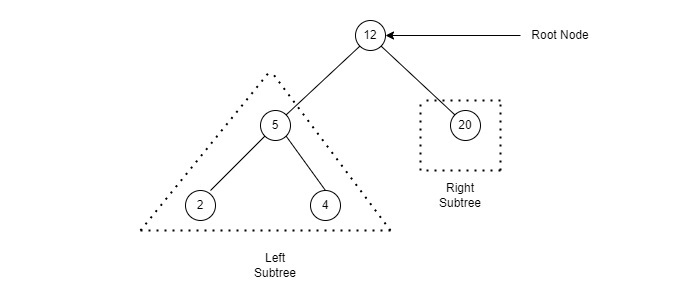
Following is a pictorial representation of BST −
Binary Search Tree
We observe that the root node key (27) has all less-valued keys on the left sub-tree and the higher valued keys on the right sub-tree.
Copied from here.

My Solution:

public class Node {
Node left, right;
int value;
public Node(int value) {
this.value = value;
}
public Node add(int value) {
if (value < this.value)
if (this.left != null)
return this.left.add(value);
else
return this.left = new Node(value);
if (value > this.value)
if (this.right != null)
return this.right.add(value);
else
return this.right = new Node(value);
return this;
}
public Node find(int v) {
if (this == null || v == value)
return this;
else if (value > v && this.left != null)
return left.find(v);
else if (value < v && this.right != null)
return right.find(v);
else
return null;
}
public int findSmallestValue() {
return this.left == null ? this.value : this.left.findSmallestValue();
}
public void traverseInOrder() {
if (this.left != null)
this.left.traverseInOrder();
System.out.print(" " + this.value);
if (this.right != null)
this.right.traverseInOrder();
}
public void traversePreOrder() {
System.out.print(" " + this.value);
if (this.left != null)
this.left.traversePreOrder();
if (this.right != null)
this.right.traversePreOrder();
}
public void traversePostOrder() {
if (this.left != null)
this.left.traversePostOrder();
if (this.right != null)
this.right.traversePostOrder();
System.out.print(" " + this.value);
}
}

Kariakoo Algorithm

Kariakoo dance asks every performer to follow a precise sequence of steps:
• Stage 0 : First, get away from obstacles by setting up your starting point at position 0
• Stage 1 : Take one step forward (+1 step)
• Stage 2 : Take two steps backward (-2 steps)
• To follow, the steps as well as the direction you will have to take in your next move will each time be obtained thanks to a specific calculation: the number of steps you took on the previous stage minus the number of steps you took on the penultimate stage.
That is, on stage 3, a dancer will have to take 3 steps backwards (-2 - 1).
At stage 3, the dancer is at position -4.
stage(n) = stage(n-1) - stage(n-2)
pos(n) = pos(n-1) + stage(n)
At stage 4, the dancer is at position -5.
enter image description here

Solution:

public class Kariakoo {
static final int NUMBER_OF_POSSIBLE_POSITIONS = 6;
final static int[] POSSIBLE_POSITIONS = { 0, 1, -1, -4, -5, -3 };
/**
* Computes the position of the Kariakoo​​​​​​​‌​‌‌​​​​​​‌​​‌‌​‌​​‌‌‌​‌
* dancer.
*/
static int getPositionAt(int n) {
return POSSIBLE_POSITIONS[n % NUMBER_OF_POSSIBLE_POSITIONS];
}
public static void main(String[] args) {
System.out.println(Kariakoo.getPositionAt(3)); // -4
System.out.println(Kariakoo.getPositionAt(100000)); // -5
System.out.println(Kariakoo.getPositionAt(2147483647)); // 1
}
}

Ma solution pour le problème de magasins

Enoncé :


Des magasins produisent tous les jours des fichiers de logs contenant les informations relatives à leur activité de vente journalière. De plus, chaque magasin possède son propre référentiel de prix journalier. Le fichier des transactions journalières contient ces infos:

 txId|datetime|magasin|produit|qte

Exemple:
1|20150302T223544+0100|2a4b6b81-5aa2-4ad8-8ba9-ae1a006e7d71|531|5
1|20150302T224008+0100|bdc2a431-797d-4b07-9567-67c565a67b84|55|3
1|20150302T224214+0100|72a2876c-bc8b-4f35-8882-8d661fac2606|39|8
2|20150302T225357+0100|29366c83-eae9-42d3-a8af-f15339830dc5|10|6
2|20150302T230721+0100|8e588f2f-d19e-436c-952f-1cdd9f0b12b0|773|2
2|20150302T231647+0100|bdc2a431-797d-4b07-9567-67c565a67b84|759|1
3|20150302T232938+0100|bf0999da-ae45-49df-983e-89020198330b|789|6
3|20150302T234000+0100|6af0502b-ce7a-4a6f-b5d3-516d09514095|520|5
3|20150302T234640+0100|29366c83-eae9-42d3-a8af-f15339830dc5|733|3
3|20150302T235351+0100|dd43720c-be43-41b6-bc4a-ac4beabd0d9b|985|9
3|20150303T000050+0100|bf0999da-ae45-49df-983e-89020198330b|307|1
3|20150303T001547+0100|6af0502b-ce7a-4a6f-b5d3-516d09514095|563|7
4|20150303T001635+0100|af068240-8198-4b79-9cf9-c28c0db65f63|733|8
4|20150303T001723+0100|72a2876c-bc8b-4f35-8882-8d661fac2606|54|1
4|20150303T001944+0100|af068240-8198-4b79-9cf9-c28c0db65f63|3|3
4|20150303T002931+0100|bdc2a431-797d-4b07-9567-67c565a67b84|124|8
4|20150303T003551+0100|6af0502b-ce7a-4a6f-b5d3-516d09514095|562|1
5|20150303T004132+0100|8e588f2f-d19e-436c-952f-1cdd9f0b12b0|266|3
6|20150303T005731+0100|2a4b6b81-5aa2-4ad8-8ba9-ae1a006e7d71|617|0
6|20150303T010831+0100|29366c83-eae9-42d3-a8af-f15339830dc5|617|3

où :
txId : id de transaction (nombre)
datetime : date et heure au format ISO 8601
magasin : UUID identifiant le magasin
produit : id du produit (nombre)
qte : quantité (nombre) prix : prix du produit en euros

Et celui du référentiel produit:
 produit|prix

Exemple:
1|63.19
2|23.86
3|12.19
4|9.54
5|23.76
6|14.46
7|32.94
8|96.28
9|8.53
10|77.43
11|17.64
12|34.52
13|59.87
14|62.25
15|92.13
16|42.4
17|52.54
18|89.37
19|80.54

20|19.41

Besoin : Déterminer, pour chaque heure, les 100 produits qui ont les meilleures ventes et ceux qui génèrent le plus gros Chiffre d'Affaire par magasin.

Télécharger la solution